Feature
AI market research that shows its sources
Ask anything is an AI market research tool: you type a market question in plain words, it reads public web sources, and it answers with a structured report covering where demand is, the key numbers, the customer segments worth selling to, and every source it used. You can turn any segment straight into a lead search or a draft campaign.
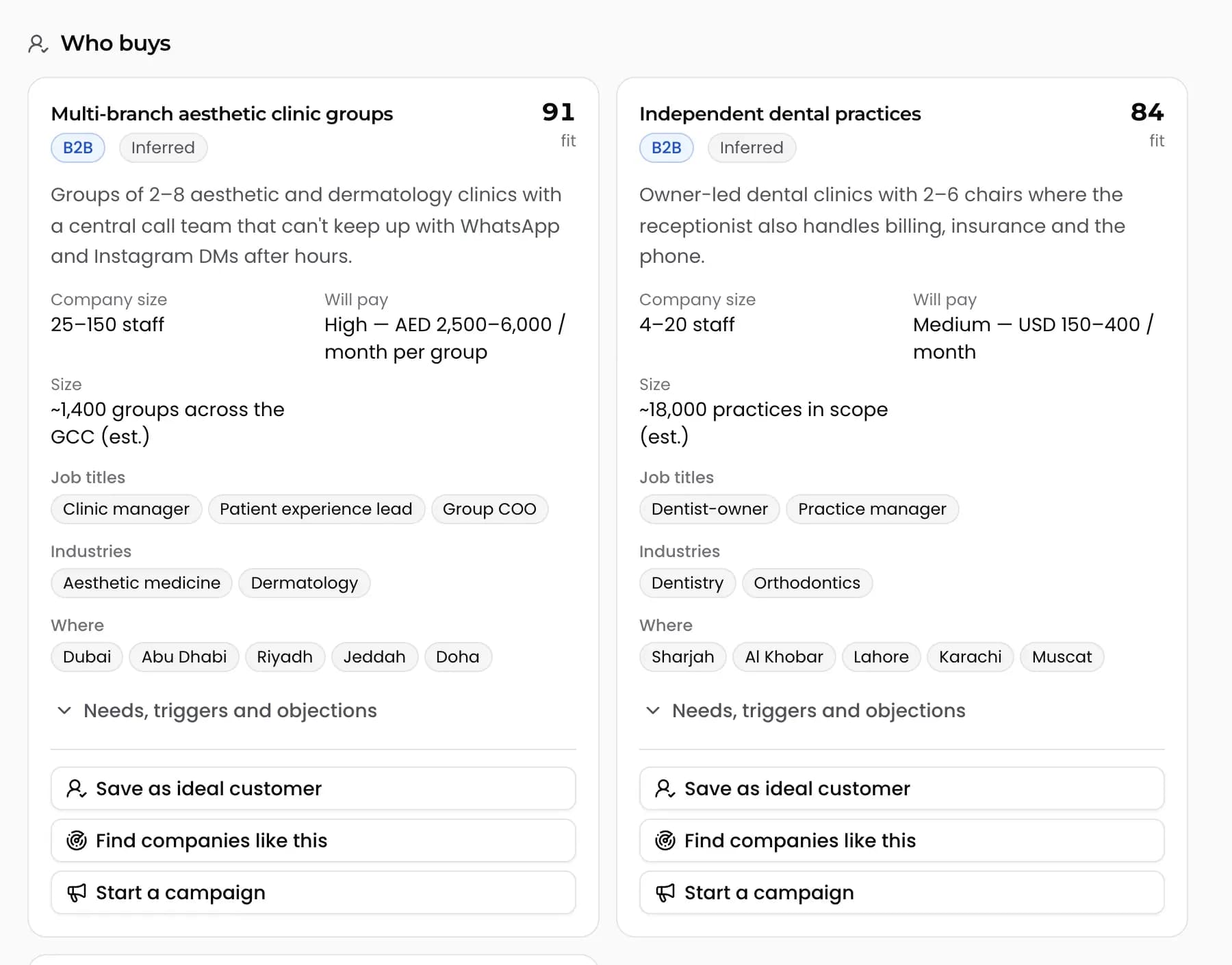
What you get back
Most AI chat tools answer a market question with a few confident paragraphs and no way to check them. Ask anything returns a document you can read, check and share. Each answer has the same structure, so you can compare one market against another.
- A demand map. A world or country map shaded by where demand for what you sell looks strongest.
- Key numbers. Market size, growth or counts where public sources support them. Anything that is an estimate is labelled as an estimate.
- Customer segments. Who each segment is, what they need, the objections they raise, the channels that reach them and the events that make them start buying.
- Every source listed. Each answer ends with the public pages it read, so you can open them and judge for yourself.
Quick or deep
Pick quick mode when you want a fast read on a question, like whether a city is worth a sales trip. Pick deep mode when you are deciding where to spend a quarter, and want the tool to read more sources before it answers.
| Quick mode | Deep mode | |
|---|---|---|
| Best for | A fast sense check before a call or a trip | Choosing a new market, segment or product angle |
| Sources read | Fewer | More, across a wider range |
| Output | Same structured report | Same structured report, with more evidence behind it |
From research to pipeline in one click
Research only pays off when it changes who you contact. Each segment in a report has three actions, so the work does not stop at a PDF.
- Save as ideal customer. Store the segment as the ideal customer for one of your products, so lead scoring and message writing use it.
- Find leads like this. Start a lead search for companies that match the segment.
- Draft a campaign. Create a draft WhatsApp campaign aimed at that segment, ready for you to edit.
How to run a useful research question
For a longer walk-through with example questions, read the AI market research guide, and use the ideal customer profile template to sharpen what you save.
- 1Pick the product the question is about. Research is scoped per product, so answers stay tied to the right brief.
- 2Ask in plain words, the way you would ask a colleague: "Which US metro areas have the most independent physical therapy clinics, and who buys equipment for them?"
- 3Choose quick or deep mode and wait for the report.
- 4Read the segments, open the sources behind any number you plan to repeat, and save the segment that fits best.
- 5Click Find leads like this to turn the segment into a list of real companies.
Frequently asked questions
Where does the research come from?
It reads public web sources at the time you ask and lists every source at the end of the report. It does not use a private database, so you can open each page it relied on.
Are the market numbers exact?
Only as exact as the public sources behind them. When a figure is an estimate rather than a published number, the report marks it as an estimate. Check the source before you put a number in a pitch deck.
What is the difference between quick and deep mode?
Quick mode reads fewer sources and answers faster, which suits a sense check. Deep mode reads more widely before answering, which suits decisions about where to focus a sales effort.
Can I turn a segment into leads?
Yes. Each segment has a Find leads like this action that starts a lead search for matching companies, plus options to save it as the product's ideal customer or create a draft campaign.
Does it work for US markets?
Yes. Research and lead finding work for any country. In the US, many business lines cannot receive WhatsApp, so research and lead lists are where the product is strongest there.
More features
Find your next customers this week.
Prime Leads Finder is opening to new teams in waves. Tell us what you sell and we'll get you in.