Feature
WhatsApp campaigns for B2B outreach, paced and permission-aware
WhatsApp campaigns send your approved first messages from your own linked WhatsApp numbers, paced across numbers, only inside the send window and timezone you set, and under daily caps. Anyone who replies STOP is suppressed across every campaign at once.
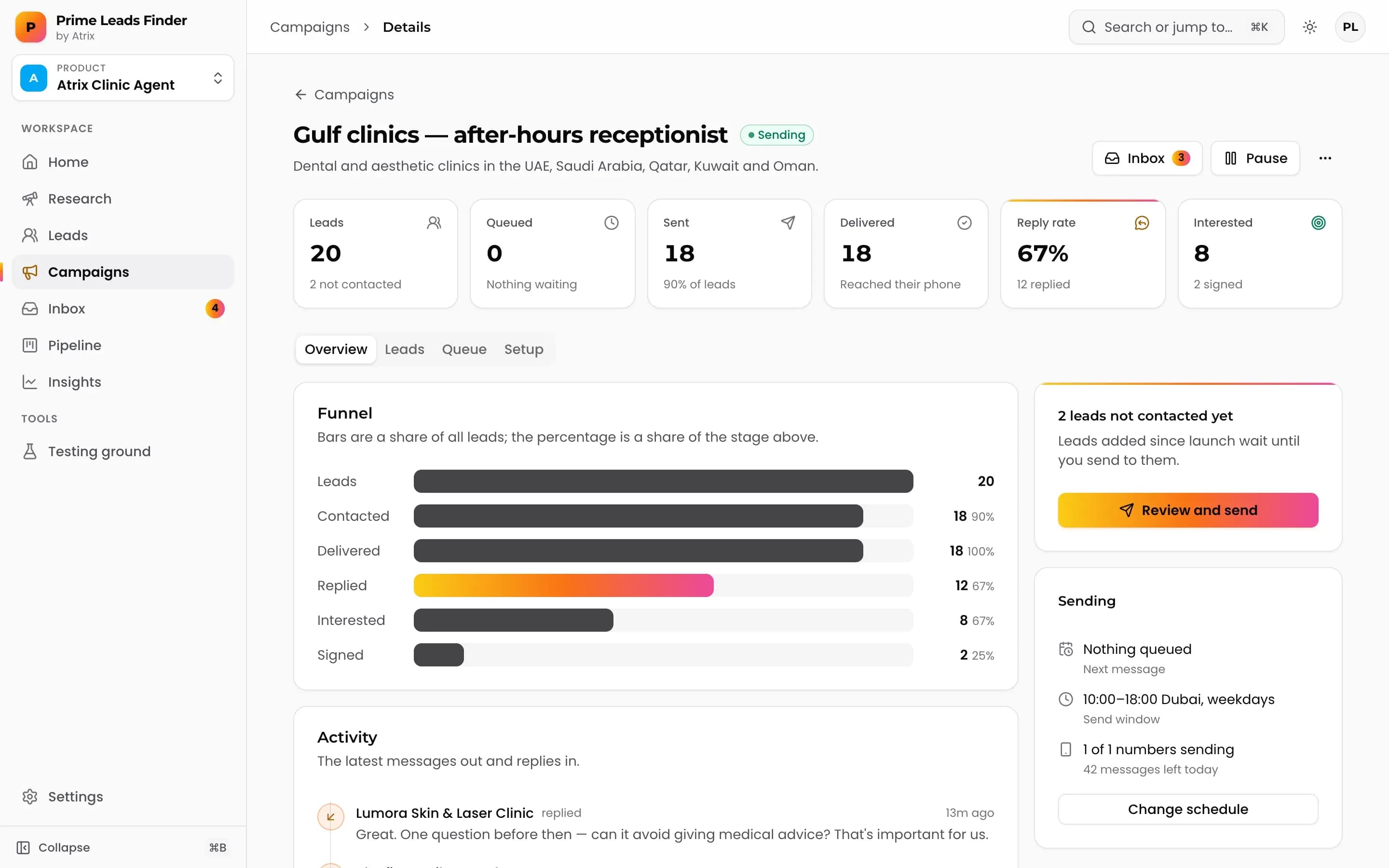
Built for markets where business runs on WhatsApp
In many markets, owners and managers answer WhatsApp faster than email or a desk phone. That is where these campaigns fit best. In other markets, including the US, many business lines cannot receive WhatsApp at all, so there the stronger fit is market research and lead finding.
Outreach must follow WhatsApp's Business Policy and the law where you and your leads are. The controls below help you send responsibly; they do not replace that responsibility.
How sending works
- Your own numbers. Link WhatsApp numbers by scanning a QR code. Messages come from you, not a shared pool.
- Pacing across numbers. Messages are spread across your linked numbers instead of fired in a burst.
- Send window and timezone. Messages go out only inside the hours you set. If leads are in another timezone, you get a warning and can switch in one click.
- Daily caps. Set a ceiling on how many messages go out per day.
- Instant opt-outs. A reply of STOP, UNSUBSCRIBE or similar suppresses that person across every campaign at once. You can also add numbers to a suppression list by hand.
Launch checklist
A readiness checklist blocks launch until the basics are in place, so a half-built campaign cannot go out by accident.
- 1Link at least one WhatsApp number.
- 2Write or approve the message. Drafts from lead research are written for each business.
- 3Choose the audience from your picked leads.
- 4Send to your own numbers first in the testing ground to see exactly what leads will receive.
- 5Set the send window, timezone and daily cap, then launch.
Careful sending compared with blasting
For the practical side of staying in good standing, read WhatsApp B2B outreach without getting banned.
| Bulk blast tools | Prime Leads Finder campaigns | |
|---|---|---|
| Message | One template for everyone | First message written for each business, approved by you |
| Timing | As fast as possible | Paced across numbers, inside your send window |
| Volume | Unlimited | Daily caps you set |
| Opt-outs | Often manual | STOP replies suppressed across all campaigns at once |
| Before launch | Nothing | Readiness checklist and a testing ground |
When someone replies
Replies land in the inbox. If you turn on the AI sales agent, it answers from your playbook, qualifies interest and hands the conversation to you when it is unsure or when the lead asks for a person. You can take over any conversation at any time.
Frequently asked questions
Does this use the official WhatsApp Business API?
No. You link your own WhatsApp numbers by scanning a QR code, and messages are sent from those numbers.
How do I lower the risk of my number being restricted?
Send fewer, better messages. Use pacing, a sensible daily cap and a send window, message businesses that fit, honour opt-outs, and follow WhatsApp's Business Policy. No tool can guarantee a number will never be restricted.
What happens when someone replies STOP?
They are suppressed at once across every campaign in your workspace. Replies like UNSUBSCRIBE are handled the same way, and you can add numbers to the suppression list yourself.
Can I reach US businesses on WhatsApp?
Often not. Many US business lines cannot receive WhatsApp. In the US, use research and lead finding to build your list, and choose the channel that suits those businesses.
Can I test a campaign before launch?
Yes. The testing ground sends the campaign to your own numbers first, and a readiness checklist blocks launch until a number, message and audience are set.
More features
Find your next customers this week.
Prime Leads Finder is opening to new teams in waves. Tell us what you sell and we'll get you in.